Monday, June 20, 2016

DashBook on Mac OSX


We have many DashBook clients running our DashBook Royalty Pro, designed for Windows, on their Macs.  Usually they use something like Parallels, VMware Fusion, or Boot Camp to host a Windows session, and have DashBook loaded into that.  The initial setup is lengthy if you do not already have Windows on the Mac, but thereafter it works fine.  Another new choice has been to use Amazon WorkSpaces to host a virtual PC online.

However, with improvements in Wine, you can now run DashBook without Windows at all.  You can easily make a Mac app of DashBook with the following:

[Video of this process here.]


Get WineBottler:  http://winebottler.kronenberg.org/  I chose the latest v1.8, not v1.6.
[Note that Tiger and Leopard require an older version, 1.4.1,  plus X11.  PowerPC?  You've got to be kidding!  This is for Intel-based CPUs only.]

Copy both Wine and WineBottler to your Applications folder.  This may need a security change to allow non Apple Store apps.  [GateKeeper security info: http://www.cultofmac.com/224876/safely-install-non-mac-app-store-apps-on-your-mac-os-x-tips/]

Download our DashBook trial from our http://www.DashBook.com website.  This will be a setup.exe saved to your Downloads folder.  Do not run this setup.exe on your Mac, but we will point to it in WineBottler.

Run WineBottler; switch to Advanced.  See the screen image below for the choices that worked for us, on El Capitan.  You also need to click and choose the following WineTricks:  (use the search field to quickly find each)
 dotnet40 jet40 mdac28 ie8 (not the ie8UpdateBlahBlah)

Note in the image below that we clicked to "Hide most dialogs".  This makes things work smoother.

(click to enlarge)

Then you click Install to make the package.  You will only need to go through the DashBook Install questions, as the others will be automatic.  Choose to not install shortcuts, and choose not to run DashBook at the end.  When finished, WineBottler will ask for which .exe to run; choose the Dashbook.exe at the top of the list, as seen here:
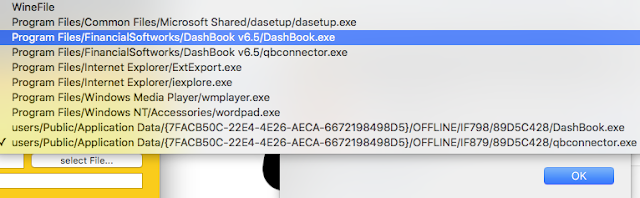


That's it! The first run will blink and give some rundll32 error, but all works after that.  Just avoid clicking the first icon in DashBook that turns off/on the dashboard, as that unfortunately terminates the session.

Once you have finished the above process, you do not need to do it again.  Just click on the DashBook app that you made, whenever you want to run DashBook.

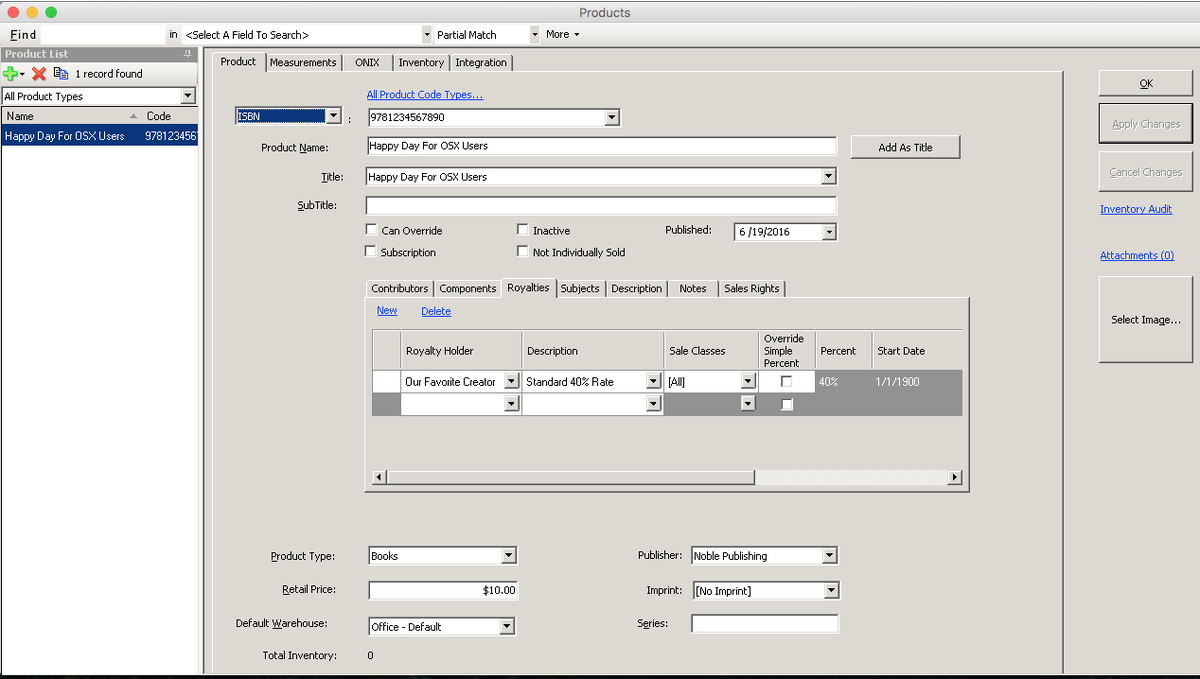
Here is DashBook running on Mac OSX, without Windows:

Enjoy!


Thursday, January 23, 2014

Royalties with QuickBooks Online Edition


Here is our DashBook version 6 announcement, which includes an option to work with QuickBooks Online Edition (QBOE). (NOTE: Intuit killed this ability, but we re-instated; desktop communication will continue as well)


We are proud to offer DashBook version 6 which builds upon years of work and customer feedback.

High on the list of improvements is speed, but we also have added more power and flexibility as well.

For DashBook v6, we restructured the royalty calculation to make it more efficient. Now royalties calculate faster than ever -- as much as 30 times faster!

You can also view order information much faster, especially if you have hundreds or thousands of products. And now deleting an order is nearly instant, no matter how large it is.

Importing sales has also sped up significantly when creating shipments.

But the larger increases in importing speed come from a new feature. Many sales reports, especially in the music business, show very detailed transactions, such that a product shows on multiple rows. You could have only 200 products, yet receive a sales file of over 30 thousand lines. DashBook v6 now has an import map option to consolidate the sales down to fewer rows. Not only will the import be much faster, but everything else downstream, such as working with the order, calculating royalties on it, and even rendering reports will be faster.

All of the DashBook v6 speed enhancements can save hours over time. We've seen it.

Our sales import is also much more powerful than before. Version 5 had a handy Skip Lines feature that allows pulling just certain rows into an order. Version 6 has changed this to Modify Data. You can request rows be dropped based on matching or not matching criteria, and can even replace a cell's content prior to import. This is especially useful when teamed with our new ability to import a single order having mixed "sales channels." For example, Modify Data can change a phrase on the report to match your sales channel phrase, so that the order and royalties understand which line item is using which sales channel.

So with mixed sales channels, a single order can now do what used to require two or more. Easily import sales of different types, such as physical vs digital, with a single import and resulting order.

Did I write Sales Channel? Well, in recognition of how versatile this feature is, we've changed the name to be Sale Class. It's not just for different sales avenues, but many different scenarios which may require a different royalty arrangement.

Version 6 also provides updated import maps for Amazon Kindle, new maps for Barnes and Noble Nook, The Orchard, Gardners, and more. If you use a common distributor sales file that we don't provide an import map for, let's add it so everyone can benefit.

Our order import, which pulls in multiple separate orders from a single file, has also been enhanced to use a contact's new default sales commission, which was critical for one of our clients handling distribution.

Royalties: While we formerly had a Less Other amount which was a fixed value per unit sold in your currency, version 6 now gives the option to take a percent off instead. So if you need to deduct 30% extra prior to calculating your royalty percent, this will be straightforward now.

If you have ever told DashBook to record a bunch of royalty payments, only to later realize that you used the wrong date, DashBook v6 now has a bulk payments delete option which will make you happy.

Reserves: DashBook never handled reserves before, but we have this as an optional module today for those who need it. Need something special? We can do it.

The QuickBooks Integration module has been great for getting data back and forth between DashBook and QuickBooks, but that only worked for the QuickBooks desktop edition before. Now in version 6, this optional module can communicate with Intuit's QuickBooks Online Edition. 
 (NOTE: Intuit killed this ability, but we re-instated; desktop communication will continue as well)

Reports: We have tweaked a number of reports. One new entrant is an Inventory Sales report.

And for distributing reports, we finally have Batch Email in the system as a beta feature pending more usage and feedback. To circumvent spam walls, you provide your email server information for DashBook to use in sending out reports.

And many more minor changes:
Do you use DashBook's database backup ability? We've made that much better with a very simple change - the option to append the date to the file name so keeping track of database versions is a lot easier.

The selection list on the product screen is now sort-able and includes name, title, publication date, and default product code. This makes it easy to see all products of a given title, for example. Some of you have this already.

We have plans for many more improvements to DashBook version 6, and hope you'll join with us on this journey.

Wednesday, April 10, 2013

ISBN, ASIN, ISRC, and other codes

Products need unique codes to identify them.  Why?  Well, people tend to use the same product names as others, so that isn't very good in differentiating one product from another.  In fact, in some businesses, all products may have the same name, but differ in other attributes such as sub-title, version, mixer, etc.

When you sell your products through distributors, other vendors, or over the internet it becomes important to use the standard product codes available there.  Many distributors will require it.

Most people have probably heard of ISBN.  That's a book code, right?  Yes.  If you are in the music industry, you might recognize ISRC as the code relating to a recording such as a track on an album.  ASIN?  Amazon decided to setup its own unique coding system that goes across all of its products, not just books.

So when you are selling your product on the internet using multiple services, you very well may end up with more than one product code for the same product!  Now you will receive a sales report from one source referring to product X, while another source indicates how many of the same product was sold, but refers to it as Y.  That could be tricky.

Fortunately, DashBook Royalty Pro can handle multiple code styles for each product.  So your book can have an ASIN, a pISBN and an eISBN (made-up variations of ISBN to indicate the difference between print and electronic).

Then when you instruct DashBook to import sales from a given sales report, you simply use an import map (relates columns in the report to DashBook data fields) that points to the proper DashBook field.  So your Amazon Kindle import can perform matches on ASIN, while your Lightning Source refers to ISBN.

Similarly in the music business, you can have an ISRC for your tracks and an SKU or Barcode for your albums or releases.  Our import mechanism might seem complex, but it is a simple relationship that directs report columns to DashBook terminology.

Do you have extra codes like Catalog Number?  No problem.  You can go to Setup->Products->Product Code Types and add your own type to your DashBook system.  On the Product screen is an All Product Code Types link where you can see all of the codes for a given product.

This all can be a bit daunting for someone new to the industry, but a lifesaver for those who have to deal with this real world.


Monday, January 21, 2013

Royalties for QuickBooks

DashBook version 5.2 has just been released!

In addition to providing additional report enhancements, the big news for this version is the new ability to create royalty checks directly into QuickBooks using our optional QuickBooks Integration Module.  Now you can pull QuickBooks invoices into DashBook, calculate the royalties using DashBook, and then create royalty checks in QuickBooks.

You can do all of this without any exporting or importing of interim files, since DashBook communicates directly with QuickBooks using Intuit's API (programming interface language).  The advantage of using the API is that QuickBooks can monitor what is being written so that it could complain if any data uploaded was not following the correct format.  This gives instant feedback that what we do is correct.

There are some details in the process, of course.  Within DashBook, you would first mark all of your royalty payments that you are paying as paid.  Then you can instruct DashBook to create QuickBooks checks for all payments within a particular date range.  Aside from providing the start and end dates, there is nothing more to do but click a button to do all of the work.

Of course, you can still import sales from other sales reports, such as Amazon Kindle, Ingram, etc.

Our enhancements to DashBook come from users like you.  If you have some special calculation, reporting, or integration work that would make your life easier, contact us.

We can help you.


Thursday, November 8, 2012

DashBook Pro Version 5.1

We are pleased (and relieved) to announce the release of DashBook version 5.1!  We have been working on this one since prior to the release of v5.0 in the spring, and thank you for all of your help.  Many of our clients have worked intimately with us, and have been enjoying some of these changes already.

What's new?  Many things, but here are some highlights:


The biggest change for v5.1 is better support for multi-users.  With this came very significant internal changes, one of which results in really fast order deletion, as an example.

Another huge addition is that you can now have default royalty arrangements, so simply linking a royalty holder to a product can automatically connect a default royalty, saving time.
Our optional QuickBooks Integration Module has major additions.  It now has an ability to start with an empty QuickBooks company file and batch create all of the DashBook products into it. You can now retrieve QuickBooks customers and products to create those within DashBook, and directly batch import a range of QuickBooks invoices to create corresponding DashBook orders.  As before, these communicate directly with QuickBooks, so no need for interim disk files.
With the improvements in multi-user functionality, we are also presenting new multi-user pricing.  You can now upgrade to a multi-user system in smaller bites, so now is a great time to add an extra user to your system.

We have done a lot of work to make DashBook better, but there are always more things to do.  We are available to customize your system for the perfect solution for you (add a feature, customize a report, make anything faster, etc.), which is how many of these changes came into being.  Although our list of ideas seem infinite, we like your direction.

Thank you very much for your support!

Cheers,
The DashBook Team
www.DashBook.com

Monday, March 12, 2012

DashBook Royalty Pro version 5

DashBook version 5 has been released!

Here is most of an email sent to our customers:

Good Day:
We are proud to announce DashBook version 5.  It has been a long time since version 4.0, but we made many improvements to v4 over its life from v4.0 through v4.5.

Version 5 will save you more time.  It loads faster so that you can get to work sooner, and many screens open and operate faster.  The royalty calculation is faster as well.  The report window - not so much, yet.

New for DashBook version 5 is our optional QuickBooks Integration Module.  This is an optional add-on to DashBook for communicating directly with QuickBooks - no interim importing or exporting files.  For this first release, DashBook can create an order directly into your company file as an invoice.  Since DashBook already imports your distributor and vendor sales into a DashBook order, you can now get that into QB without duplicating effort.  Go from double-entry to zero entry!

Another huge change is the introduction of a new entity - a Title property.  Each product now belongs to a title, and if you were recording payments to a product before, you'll record payments to a title in version 5.  This will make it much easier to handle product variations.  You can keep each product separate, with its own format, pricing, and royalty structure, then record payments to the title as a whole.  Of course, each product could be a separate title, so there is no loss in functionality either.  A win-win.

Have you been annoyed that your royalty holders have to all be called an author/artist?  This has been remedied in v5.  The Setup->Contacts->Contact Types now has a Royalty attribute so that any contact type can participate in royalties.  You can create a contact that is just an illustrator, editor, songwriter, etc., and not have to pretend that they are something else.  All contacts that can receive royalties will be available to connect to products and royalty arrangements.

Version 5 also starts down a complex road to simplify your work further.  We've added a feature to download sales reports directly from vendor sites.  This is difficult work for us, because as you can imagine, no two websites are the same.  To start, we include:  All Romance, BooksOnBoard, and BookStrand.  You can not only have DashBook login and download your sales report, but also kick-off the import for you as well.  We'd love to include more of these, but they are expensive to implement.  Feel free to throw us incentives!

The above are some of the largest changes, but we've done a lot of tweaking as well.  Imports have continued to be improved (more setup importing, import a net price while retail is zero).  MasterShare fractions for music.  Fractional sales quantities along with a new service invoice.  Upload a single royalty holder's report to Box or Google Docs.  Combine all royalty reports into a single PDF.  A new Products and Royalties Checklist report for finding products that are missing royalty connections.  Royalty Detail by Title report.  ONIX report work-in-progress.  Royalty Summary report from the Pay Royalties screen.  Better search field on Product screen....

Yes, a lot of improvements.  And of course, we expect more improvements in the upcoming weeks and months.

Please order your upgrade now.

This is a limited time price discount on upgrading.  Feel free to buy the upgrade today and wait until later to install the new version (you will receive a new registration key and download instructions after purchase).

If you would like to upgrade to our network version, please contact us.

With your upgrade to version 5, you will continue to receive superlative support.  In order to keep our costs and your prices down, version 4 support is being discontinued.

Thank you for supporting us so that we can keep helping you!

Sincerely,
The DashBook Team

Wednesday, February 8, 2012

Tough times for publishing?

The official letter has now gone out that Ron Watters is discontinuing support of his popular AnyBook royalty software system.  In this letter, he states that he has experienced an economic downturn for the past few years from which they have not been able to recover.  Graciously, he proffers DashBook as a good alternative to AnyBook, and notes that AnyBook data can be imported by DashBook to help with the transition.

A few years ago, Publishers Assistant aka pubAssist discontinued selling their royalty system, although they will provide support for an ongoing fee.  They said that the world has changed, and offering a $1495 software solution is no longer accepted.

How has DashBook been doing?  During this time, we've been growing, perhaps to the detriment of our competitors.  We have no desire to put other products or companies out of business, but we have a strong desire and push to create the best royalty accounting system available, and at an affordable cost.  At only $495, DashBook bests the others in price in addition to the extra benefits to the publisher of its advanced features and functionality.

Our DashBook version 4.5 is the best software available for companies not willing to spend tens of thousands of dollars on a royalty solution.  In fact, in many facets, DashBook is better than some of those as well, and we're not finished with our ongoing improvements.

Sales of DashBook have been growing, as have the businesses of many of our publishing clients.  The publishing world has been going through massive changes, but nimble companies can make the best of a situation.  For instance, E-book sales are skyrocketing!

This means that many more publishers now have to deal with multiple formats of their titles.  To make this even easier, we will soon introduce DashBook version 5 that builds upon the success of version 4.

We're here, and we're growing stronger to help you even better!

Thursday, November 3, 2011

PayPal discontinues MassPay

Normally when someone who is evaluating DashBook asks why they cannot send out royalty payments directly via PayPal through our software, it is because they simply did not set it up.  It is a very quick and easy procedure consisting of logging in to one's PayPal account and requesting API signature information which provides the credentials that DashBook needs to communicate on behalf of their business account.

PayPal's MassPay does not work with personal accounts, so an upgrade to Business or Premier might be required.  Why does DashBook use PayPal's MassPay system for electronic payments?  MassPay is a great way to handle paying a handful or hundreds of royalty holders at once.  It also fits nicely in the business model, as the sender pays a fee that is comparable to or cheaper than mailing costs, and the recipient receives the full funds without additional fees removed.  Other methods of PayPal payments would have the royalty holder receive less than the royalties due.

PayPal MassPay has been a great system for DashBook users, who are primarily book publishers and music labels right now, although of course our system handles many more businesses interested in tracking royalties and licenses.  It is very simple and easy.  One screen shows all of the royalty amounts owed for the period chosen, and one click can fire off all of the payments and record that information into DashBook for account balance purposes.  Life is good.

So when one of our new book publishers started asking about her inability to use PayPal, the answer seemed obvious.  "Go to this PayPal website page to get your account information; paste it here in DashBook."  Ah, but not so easy this time! Her PayPal system didn't have MassPay activated, and calls to PayPal resulted in her telling us that PayPal has discontinued MassPay for all but huge corporations.

What?  Isn't PayPal for the little guys who don't already have large systems setup?  If your company is already large, wouldn't you have EFTS (Electronic Funds Transfer - like direct deposit) to handle all your needs?

Well, after spending hours on the phone with various PayPal personnel, it looks bad.  Whether their decision is due to "abuses" or "high risk" (their terms), they have indeed disabled MassPay from the majority of their accounts while leaving it intact for a handful of large multinational corporations.

This is huge news.  Why isn't there outrage everywhere today?  Maybe because they did this months ago, and perhaps our clients that use this feature only pay quarterly or semi-annually, etc.
[Edit:  It appears those using it regularly have been grandfathered.]

What did PayPal recommend that we do?  Trash our MassPay API program code, and rewrite it for their alternative Adaptive Payments style, which puts the burden on the recipient for the fees -- and those fees are much higher than the $1 USD cap that MassPay has.

If you've used MassPay, contact PayPal immediately to see if they will re-instate your account. [Edit: First go to your account, select Send Payment, select MassPay, and see if yours is disabled.]

If you have experiences about this, please reply to this post so that we can all learn.  Unfortunately, change is not always for the better.

Monday, October 24, 2011

Streams versus downloads

With DashBook, it is easy to setup one set of products that receive different types of royalties depending on the product's usage by using our Sales Channels feature.

For example, let's say that you pay 75% of U.S. mechanical for a particular song.  For a 5 minute song, a 9.1 cent mechanical would be $0.06825.  But if the transaction report you receive also has streams of this song paying you 2 cents, you'd lose over twice as much as you receive by paying mechanicals on streams!

So, in DashBook, you use Sales Channels such as "Sales" vs "Streams" to distinguish what happened with a song.  Your royalty arrangement can then be set to 75% mechanical for all transactions on a "Sales" order, but 50% on all transactions on a "Streams" order.

So whether you are paying songwriters, publishers, or the artists themselves, DashBook can handle it.

Thursday, September 1, 2011

QuickBooks for royalty accounting

QuickBooks is a useful program for general accounting, but is inadequate for handling the royalty calculation needs of businesses like book publishers, record labels, music publishers, etc.  That is why royalty software such as DashBook is so important.  Royalty accounting can be so much easier with a great system.

On the other hand, while DashBook makes handling royalties very easy (import sales reports, email or upload royalty reports!), it does not handle all of the general accounting tasks.

Obviously, putting these two together makes sense.  Already, one can generate sales reports from QuickBooks including product codes (ISBN, ISRC, SKU, etc.), quantity sold, and net received, and import those transactions into DashBook.

But we can always do better.  One of our clients is growing so rapidly and has had such positive experiences with our DashBook team, that they've asked for our help.  After discussions and consideration, we've turned the problem upside down to create a fantastic solution for them.  Now they can continue their great growth, supported by an even better system.  And they are pretty excited!

What can we do for you?


Monday, April 25, 2011

Music Master Royalties

DashBook 4.5 is on our website available for downloading.  One of the extensions of this version is the ability to specify a single master share percentage on a product.  Each royalty arrangement connected to this product will be multiplied times this master share percent.

This means that you can create fewer royalty arrangements for artists or royalty holders who have songs on an album, of which you may not even know how many other tracks are there.  If your song's share is 10% of an album, you can simply create the album product with a Master Share of 10% and point the royalty to a generic royalty for your artist.  That generic might be, say 20%, resulting in .2*.1= 2% royalties for your artist.

You no longer need to multiply the master share by the artist percent, as DashBook v4.5 can now do that for you.  By using a generic arrangement of 20%, that royalty can be used on many different products, each having a different master share.

We continue to enhance DashBook to make your work easier.  Please let us know how we can help you!

Monday, February 28, 2011

Busy accounting season for royalties

Whew!  This is a busy time of year.  It is not uncommon for businesses to procrastinate on their royalty work to the very end - or even long after their deadlines.  As it turns out, they discover that they don't die after all!

However, all of this putting off of work just adds to the stress of operating a business.  When you know that you have to start organizing all of your sales, update your Excel spreadsheets or QuickBooks system with the latest releases, go through each royalty calculation in detail, print and mail reports,....  Just the thought of it all is exhausting.

Of course, you know there has to be a better way.  And there is.  You google for "royalty software" and discover DashBook and other choices.  Should you download and try?  So much work to do.

There is a lot of work to do -- no denying it.  But with some upfront time invested in setting up a royalty system, subsequent royalty and pay periods become so much easier.  We have customers saying that they've gone from a week of pain to an hour or so of work and review.  So yes, it is worth it!

The setup itself does not have to be painful.  Consult with us, and we can do most of the work for you.  We recently helped a music label setup a database within hours of receiving their CD Baby sales report and a little information about the percentages that they pay to the artists.  DashBook created all of the tracks and albums sold during that period, along with connecting the artist and royalty calculations together, in a matter of minutes by using our import system.  All the record label had to do was to add the additional tracks to the albums, and send out reports and payments.

Since they only paid their license holders via PayPal, a quick setup and a few mouse clicks, and they were done!  They even took advantage of DashBook's ability to upload royalty reports to Box.net, so they didn't have a single thing to print or mail.

Whew!  After years of agonizing, they finally have a system that just does it all for them, and it only cost them $499 for the license.  We did all of that setup for free, and provided them the database in less than a day.  Perhaps your setup might require more work for a small fee, but perhaps not.

As a friend of mine would say, "What a bargain!"

Tuesday, December 14, 2010

New Royalty System for Music and Books

DashBook version 4.4 has just been released!

Although there are many refinements in this version due to our great customer suggestions, one of the largest changes is the segregation of the book and music businesses, which will be especially helpful for those new to DashBook.

Now, when one chooses that they are in the Music Business from the DashBook setup wizard, our royalty software program will configure itself so that the terms "author" and "ISBN" are no longer used.  Music businesses will be able to see "artists" and "ISRC", etc.  Even though DashBook has handled music calculations well for over a year, this terminology improvement will make DashBook fit more like a glove so that record labels, publishers, and distributors can easily handle their royalties and licenses.

Likewise, for those in the Book Business, DashBook will no longer present questions about track length and mechanical royalties which could have been a bit confusing.

Additionally, we have added a field for License Number on the royalty arrangement screen so that you can tag your calculation with the information needed to communicate with other companies.

These changes make DashBook conform to your business better, so that you do not have to change the way you think in order to use DashBook.  If you have any further suggestions, please let us know.

Monday, November 29, 2010

Publishers improve royalty systems

When we first started working on the design of DashBook, our software for handling royalties, we had great help from a book publisher who was dissatisfied with the systems out there.  They had old interface styles with data crammed in screens, one was a web-based system that barely did anything, and others were very expensive yet you couldn't test them out by yourself.

Since we released DashBook a few years ago, we have had a wonderful welcome from the community of book publishers, and have been prodded by the music industry to make great enhancements in our system for them.

We can always come up with more ways to make our royalty accounting system better.  There will be more ways to make it faster to use, have it handle more things automatically, and even still there may be some odd calculation style that can be added.

But what we value the most is our user feedback.  Sometimes we have been staring at our screens too long to notice obvious improvements that someone who just downloads our free trial will point out. That's wonderful!

We are very happy that our customers and reviewers let us know how we can best change DashBook to suit their needs.  DashBook has grown to be the best value out there in all price ranges due to our simply listening and reacting to the comments and suggestions we receive.

If you would like an alternative to generic accounting systems like QuickBooks, so that you can take advantage of easy specialized royalty calculations, importing of your sales data, and professional reports that are easily emailed or copied to folders on the internet, you owe it to yourself to check out DashBook!  The program that your industry has grown.

Tuesday, November 2, 2010

Help other publishers

Publishing is not a zero-sum game.  If a customer were to only purchase one product (book, song, etc.) in their lifetime, then yes, that customer would no longer be available for any other publisher or vendor.  But it doesn't work that way, of course.

We all know that consumers consume, and some of them do it quite often and in mass quantities.  However, what they consume and how they consume it is fickle.  There was a time when consuming media meant a newspaper or a book.  Times have shifted toward multi-media information from the internet, electronically printed books, audio books, movies, etc.  So help generate a feeding frenzy for what you have now.

What this means is that as a publisher of a particular media type or genre, it behooves you to embrace your competitors!  If everyone but you abandons a field, you are alone, so you surely do not want your customers leaving your area of interest.

Seek out your competitors and start communicating.  Perhaps you could team up to develop a convention or even a #tweetchat.  When you brainstorm with your competitors new comrades, you will come up with many ways to target this common market that can be mutually beneficial.

Don't think that you have to "go it alone," as that is not the best way of doing it.

I'd love to hear your experiences of working with other publishers.

Monday, October 18, 2010

Share royalty reports using Box.net and Google Docs

We will soon be releasing a new version of DashBook that extends our use of the internet, and gives another alternative to printing and mailing physical reports in addition to our current ability to email reports.

Our next version will allow you to batch upload reports to folders on Box.net and Google Docs.  How might you use this?  Let's say you have a folder for each royalty holder, and have shared that folder with her or him.  After you've finished importing your sales reports so that DashBook can calculate your royalties, you can simply go to the royalty report you prefer and choose to Batch Upload the reports.  Each royalty recipient's report will be generated and copied up to their particular shared folder on the internet without requiring any further action on your part.

If you upload to Box.net, all collaborators will be notified (default setting) when a new file is uploaded to the folder you share with them, so you won't even need to directly let them know that they have a new royalty report.  It is all automatic!

This is just the latest of many features in DashBook that keep you productive so that you do not have to spend days working on royalty accounting.  Leave all of the grunt work to DashBook!

Friday, May 21, 2010

Complex royalties like physical vs. digital with stages

In our ongoing quest to make DashBook the best that it can be, we have released DashBook v4.1 that continues to extend the ease at which one can manage complex royalty contracts.

Version 4 added Generic Royalties, so that one can create only a single or handful of royalty calculation styles and apply them across many products (books, tracks, CDs, films, apps, etc.) and the entities needing to be paid (artists, authors, publishers, etc.).  With a few more extensions, v4.1 is even more powerful!

v4.1 now has the ability to use Generic Royalties to describe sales channels (different percents based on how a product was sold) and breakpoints (different percents based on the staging or thresholds of sales).

As an example, it is very popular in the music business to pay different royalties on the same work based on what happened, such as the physical sale of a CD, the purchase and digital download of a single track or song, the streaming of a song, or a performance.  DashBook has been able to handle this since its inception, but now it is even easier.

In prior versions, if you had certain sale thresholds (breakpoints) to meet, like a different percent for the first thousand units, that style was incompatible with a different royalty based on sales channels.  Now you can easily have both at the same time.

From the product screen, you can simply reference that a particular royalty holder (author) uses a particular royalty agreement.  Now you can restrict that royalty agreement to a particular sales channel, and that royalty agreement can already be making breakpoint decisions based upon sales levels.  So you'll be able to reference a royalty agreement paying on mechanicals for only physical sales, and another agreement staging the percentage paid but only on digital -- well, whatever your contract requires.

I know that what I am talking about will not be easily absorbed by most readers, but believe me, this is huge.  Contact us at DashBook, and we will help you setup your royalty system so that it handles everything you need, while making it very easy to maintain and extend.

It looks like we need more instructional videos!

Tuesday, March 23, 2010

Royalty calculator for iPhone

Given how robust our DashBook desktop royalty solution is, perhaps the iPhone program is more aptly called a Royalty Estimator.

In any event, a few weeks ago we released our first iPhone app, entitled Royalty Calculator.  This app runs natively on the iPhone and gives quick answers to the simple questions of, "How much royalty would a sale of so much be?"  If you are in the music industry, you would be pleased to see that this app will calculate your U.S. mechanical rights for you based on your song or track length.

For all industries, the percentage calculator will instantly show you the royalty either before or after discounts.

This app can be good for publishers of books, music, etc. in estimating the royalties they might owe.  It is also an excellent tool for the author, musician, etc. in determining how much they might make.

Right now and for the foreseeable future, this iPhone app is FREE!  This link will show you screen examples, as well as provide a link to download Royalty Calculator to your iPhone/iPod or iTunes account:
http://dashbook.com/CalculatorIPhone.aspx

If you prefer a program that remembers special royalty deals for each author or artist, of course DashBook will do that job handily.

Wednesday, February 10, 2010

Royalties for iPhone Developers

I have just learned that Michel Kripalani of Oceanhouse Media will be giving a talk this Friday at MacWorld 2010 on the subject of "Building an iPhone Publishing House."  What makes this session particularly interesting to me is that he will be discussing the securing of intellectual property such as content to quickly bring value to one's App, and after his exhaustive research of software to handle tracking such license payment requirements, Oceanhouse Media chose DashBook!

When Michel first approached us about using DashBook, we had only recently introduced our version 3 that supported importing sales reports to use as the data for royalty calculations.  However, we did not yet have an import for Apple's iTunes sales reports.  With Michel's input and the use of DashBook's extensible import mapping architecture, we were able to quickly send him an import map that allowed his trial version to import his sales from each of the seven regional reports that Apple generated.  Needless to say, he was impressed with our rapid response.  Of course, already having an import that could convert currencies, along with the existing royalty calculation abilities that supported multiple payees per product helped, too!

After Oceanhouse Media purchased a license to DashBook and began using it, they continued to offer great suggestions to refine DashBook for the market of iPhone and iPod (and now iPad) developers.  One of his requests was the ability to easily specify the deposit fees that were charged, and automatically spread those costs across the apps sold in that period and region.  Fortunately, DashBook already had an option to reduce the amount received by various costs, so he was able to bend it to his will.  However, DashBook v4 will soon be released which will provide a simple entry during import to a cost item whose name will makes sense - "Payment Fees."

We are very happy to work with companies such as Oceanhouse Media who seek perfection in their operations.  DashBook is a powerful system built on a flexible architecture, and our team is committed to providing the best system there is.

Thanks to everyone!

Friday, February 5, 2010

Your new royalty accounting system

We are excited about our upcoming version 4 release of DashBook!  As publishers stop paying high monthly fees for their old royalty accounting systems and switch to the powerful and more affordable DashBook, we have been getting an increasing interest in moving all of their pre-existing information to DashBook.

Way back in DashBook version 1, we included the ability to import contacts from your Outlook database, and we also imported complete information from older systems that small publishers used, like AnyBook.  We continued enhancements to include the ability to import contact information from csv files and the old PUB123/JAYA123 systems with our version 2 update, I believe.

In version 3, we broke into whole new territory with our creation of Sales Report Import.  By including a user-extensible system that came preloaded with the ability to easily import sales reports from Lightning Source, Fictionwise, Apple iTunes, MidPoint Trade, and many other book sellers and distributors, DashBook opened up to a new level of customer who loved this automation.  Gone were the days of typing in orders!

Well, version 4 will be extending that slightly by adding import for Ingram reports (and yes, we handle just about all book distributors and a growing list of music sellers and distributors), but the big extension is the ability to import nearly anything.  This was a requirement to migrate historic data from large older systems like Bookworks, Acumen, and Cat's Pajamas.

If you can get your data into text reports, DashBook will be able to move this information into a new DashBook database so that you can efficiently transition from your prior system, even if it is just spreadsheets, to DashBook.  And of course, DashBook still uses an open database system that does not lock up your data from your own reporting tools or desire to move away from DashBook at your whim.  (of course, we'd rather keep growing and improving DashBook to better serve you!)

If you have existing inventory, sales, royalty, or other information for your books, music, etc., let us help you get started in using DashBook today.